
Session Engineering(二):加一层总办,人只对接一个会话
Session Engineering, part 2: one session between me and the rest
11 月 7 日晚上,要我处理的事攒了二十多件,分散在十几个会话里。之后我们加了一层总办:各会话把要我定的事发给总办,总办整理到一个待办页,我在手机上点选、统一发送,再由总办转回各会话执行。本文写这一层怎么运转:请求怎么写,总办怎么分流,转达的决定怎样算数,会话之间的消息额度,以及几项可以对照的历史制度。
On the night of Nov 7, more than twenty items waiting for me had piled up across a dozen-plus sessions. We then added a chief-of-staff layer. Sessions send what needs my decision to the chief of staff, which collects it on one page; I go through the options on my phone and send them in one batch, and the chief of staff relays each decision back for execution. This post covers how the layer works: how requests are written, how the chief of staff filters them, when a relayed decision counts, message quotas between sessions, and a few historical institutions to compare it with.
上一篇《Session Engineering:组织多个 Agent 会话,也是管理自己的上下文》写了 Tenon AI 从 11 月 6 日开始的分工:每样东西只有一个负责的会话,跨组的事设一个牵头会话,会话之间的消息不算批准。规则定下的第二天晚上,出现了一个上一篇没有解决的问题。
二十多件事,分散在十几个会话里
11 月 7 日晚上,各会话攒下了二十多件要我处理的事:要我拍板的决定,要我登录或者在手机上操作的步骤,要我确认的对外文案。它们分散在十几个会话里,我要逐个切进去,读完上下文再回答。
上一篇说过,每切到一个会话,人都要先想起它负责什么、做到哪了、在等我什么。每个会话都把这三件事写清楚以后,切一次快了很多;但只要要我处理的事分散在各处,切换的次数就省不掉。
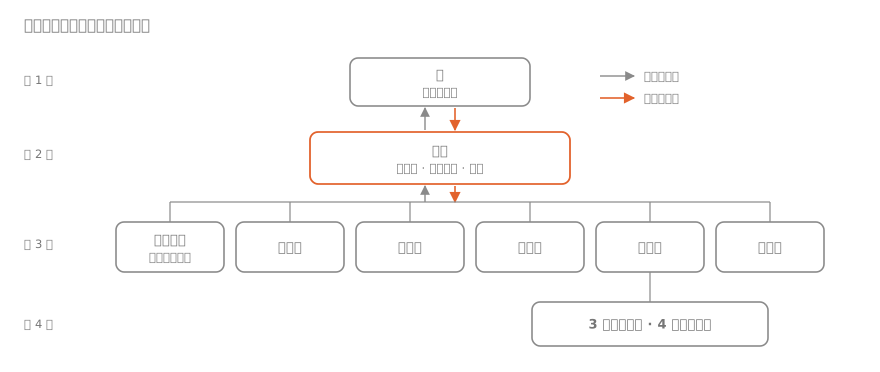
加一层:总办
做法是让我只对接一个会话,就是总办。其他会话把要我定的事发给总办,不直接找我;总办整理好交给我,我决定后再由总办转回去。
| 角色 | 负责 | 不做 |
|---|---|---|
| 人 | 方向、决定、验收;亲自确认对外而且不能撤回的动作 | 具体实现;逐个盯着会话 |
| 总办 | 人的唯一入口:待办页和决定记录;转达;分流;规范和名册;每周汇总 | 写代码、改产品 |
| 组(牵头会话) | 一类事的负责人,比如平台、安全、法务、运营、商务;管下面的会话和定时任务,代转通知 | 别的组的事 |
| 执行会话 | 一个产品、一个项目或一件具体的事;职责内自己判断 | 改别人负责的东西 |
| 定时任务 | 按时做固定的事,结果报给所属的组 | 越出任务说明 |
层级是人、总办、组、执行会话,三到四层。每多一层,转达就多一次,所以只在会话多到总办直接管不过来时,才加「组」这一层。现在运营组下面管着三个渠道会话和四个定时任务,就是这种情况。
产品的需求、功能和设计是例外:这些我还是在各个产品的会话里直接打磨,不经过总办。
请求怎么写
发给总办的请求,一件事一条消息,写清六项:
- 要定什么;
- 建议和备选;
- 期限;
- 涉及哪些会话;
- 能不能撤回;
- 定了以后谁做什么。
标准是不看提出请求的那个会话,也能做决定。这和上一篇说的「每轮结束写两三句现状」是同一个思路:让读的人不用回去翻聊天记录。
向总办只报三类事:要我决定或操作的事,我交办的事的结果,风险和事故。日常进度写在各自的文档里,由总办每周汇总。
总办会退回请求
总办不只是转发。职责内能自己判断的事,不该发给总办:只动自己负责的东西、能撤回、不花钱,也不对外。这类请求到了总办,会被直接退回去,并说明理由。几个会话为同一件事发来的请求,总办会合并成一件。
待办页
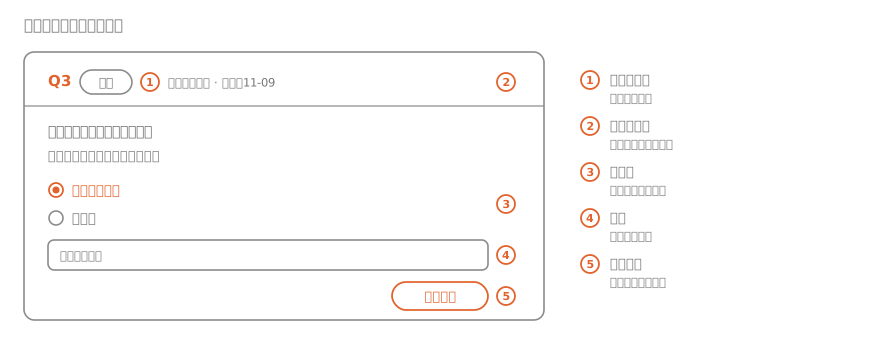
总办把要我定的事放在一个页面上。每件有编号、类型(决定还是操作)、来源、期限、说明和几个建议项,推荐的那项标出来,我可以加备注。页面每次都列出全部待办,按期限排序。
我在手机上逐件点选,最后统一发送。页面通知总办,总办把决定转回各会话执行,再把这件移到「已办」,写上结果。第一次提交了 13 件,几分钟就处理完了。
页面上的选择只有我自己的账号能写,可以当作授权的凭据。总办同时把决定写进仓库里的决定记录,写明日期、决定、我的原话或页面上的选择、转给了谁。我也可以直接在总办的会话里回编号,比如「Q3 不改」。
转达的决定怎样算数
总办转达的决定,视同我本人的决定。转达里会引用我的原话,或者待办页上的编号、选择和备注;接收的会话可以到决定记录里核对,然后照办职责内的事。其他会话之间的消息,仍然不算批准。
例外是本来就要我批准、又对外而且不能撤回的动作:提交审核、首次上线、付款、以公司名义给外部的人发信、删除数据、改账号的安全设置。这类动作,执行的会话可以要求我在它自己的会话里确认一次。11 月 8 日凌晨,WeSaid 的新版本要提交 App Store 审核,负责 WeSaid 的会话没有接受总办的转达,最后由我在浏览器里点了提交。理由是接收的会话无法证实一段转达就是我本人的意思;一个会话出错或被误导时,这一步能挡住不可逆的后果。代价是我多点一下。
日常动作另有常设授权,比如各渠道的日常内容审完直接发,写在各组的文档里,不用每次请示。
消息额度
会话之间发消息有额度。我们遇到的限制是:人每发一条消息,一个会话最多给其他会话发 10 条,超了就暂停,等人再发消息。应对的办法有四个:
- 同一个会话的几件事并成一条;
- 发给全部会话的通知,交给各组的牵头会话代转,每个会话的额度分开算;
- 额度用完时,我在总办的会话里随便回一句;
- 待办页的页头显示总办还剩多少额度。
可以对照的历史制度
一个人通过一层机构处理大量请求,历史上有过几种做法。它们和这里的对应关系如下:
| 制度 | 原来的做法 | 对应到这里 |
|---|---|---|
| 唐代三省六部 | 中书省起草,门下省审核,可以封驳退回,尚书省交六部执行 | 会话起草请求,总办审核分流,我决定,会话执行;总办要能把不该上报的请求退回去 |
| 明代票拟、批红 | 内阁在奏章上拟好处理意见,皇帝用朱笔批准;批红后来交给司礼监代行,出过大问题 | 总办给每件待办附上建议项,我点选;不可逆的事不由总办代批 |
| 虎符 | 调兵要两半虎符合在一起才算数 | 对外不可逆的动作,要我的确认和总办的转达同时具备 |
| 任务式指挥 | 上级只下达意图,下级自己决定怎么做 | 写清职责和常设授权,会话在职责内自己判断,不事事请示 |
这一层的代价
- 转达多了一次。总办转错或漏转,会话就会按错的做,所以决定要写进决定记录,接收的会话可以核对。
- 总办的上下文也有限。会话的上下文会被压缩,所以规范、名册、待办清单和决定记录都写在仓库的文件里,不靠总办记在聊天里。
- 换一个平台,这套做法要重新搭。我们把和平台无关的部分整理成了一份通用规范。换平台时先确认目标平台有没有这六种能力,缺哪一项,就用文件加人工转达补上:
- 多个能长期运行、各有上下文的会话;
- 会话之间能传话,或者能读写同一组文件;
- 一个能在手机上点选、提交后能通知到总办的页面或表单;
- 所有会话都会读的说明或记忆文件;
- 定时任务;
- 会话执行对外动作前,要人确认的机制。
现在的样子
现在我一般只在总办的会话里回复。各会话的请求在总办那里排好,我有空时打开待办页处理一批;产品的需求仍然在各个产品的会话里直接打磨。
这篇文章也走的这条线:我在总办的会话里说想写这篇,总办把素材转给运营组,运营组写稿、画图、在本地预览,再把要我确认的事交给总办,放进待办页。
The previous post, Session Engineering: organizing agent sessions is also managing your own context, described how Tenon AI divided work from Nov 6: each thing has one owning session, cross-group work has a lead session, and a message between sessions is not an approval. On the second evening under those rules, a problem came up that the first post did not solve.
Twenty-odd items across a dozen-plus sessions
On the night of Nov 7, the sessions had built up more than twenty items waiting for me: decisions to make, steps that needed me to sign in or act on my phone, and public copy to confirm. They were spread across more than a dozen sessions. I had to open each one and read its context before I could answer.
The previous post noted that each time a person switches to a session, they first have to recall what it is responsible for, where it stands and what it needs from them. Once every session states these three things, a single switch is much faster. But as long as the items waiting for me are spread out, the number of switches stays the same.
One more layer: the chief of staff
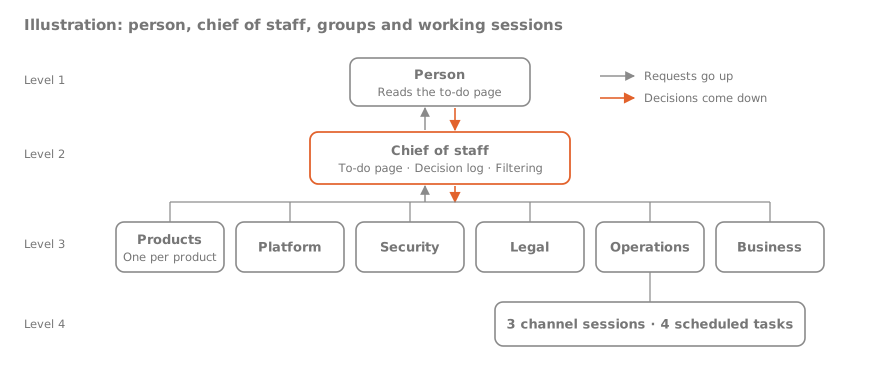
The change was to have me deal with only one session, the chief of staff. Other sessions send what needs my decision to the chief of staff instead of to me. The chief of staff prepares it for me, and after I decide, it relays the decision back.
| Role | Responsible for | Does not |
|---|---|---|
| Person | Direction, decisions and acceptance; personally confirming public actions that cannot be undone | Implementation; watching each session |
| Chief of staff | The person's single entry point: the to-do page and the decision log; relaying; filtering; the rules and the roster; a weekly summary | Write code or change products |
| Group (lead session) | Owner of one area, such as platform, security, legal, operations or business; manages the sessions and scheduled tasks under it and passes on notices | Other groups' work |
| Working session | One product, one project or one specific job; decides on its own within its responsibilities | Change what others own |
| Scheduled task | A fixed job on a schedule, reporting to its group | Go beyond its instructions |
The layers are person, chief of staff, group and working session: three to four levels. Each extra level adds one more relay, so the group level is added only when there are more sessions than the chief of staff can handle directly. Operations, which manages three channel sessions and four scheduled tasks, is one such case.
Product requirements, features and design are the exception. I still work those out directly in each product's session, without going through the chief of staff.
How a request is written
A request to the chief of staff covers one matter per message and states six things:
- What needs to be decided;
- The recommendation and the alternatives;
- The deadline;
- Which sessions are involved;
- Whether it can be undone;
- Who does what once it is decided.
The test is whether someone can decide without opening the session that raised it. It follows the same idea as the status notes in the previous post: the reader should not have to go back through the chat history.
Only three kinds of things are reported to the chief of staff: items that need my decision or action, results of work I assigned, and risks and incidents. Day-to-day progress stays in each session's own documents, and the chief of staff summarizes it weekly.
The chief of staff sends requests back
The chief of staff does more than forward. Anything a session can decide within its own responsibilities should not go to the chief of staff: it touches only what the session owns, can be undone, costs nothing and is not public. When such a request arrives, the chief of staff sends it back with the reason. Requests from several sessions about the same matter are merged into one.
The to-do page
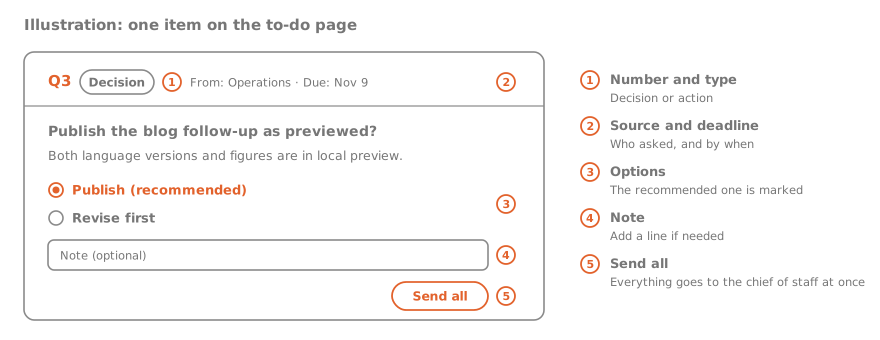
The chief of staff puts everything that needs my decision on one page. Each item has a number, a type (decision or action), its source, a deadline, a description and a few suggested options, with the recommended one marked; I can add a note. The page always lists every open item, sorted by deadline.
I go through the items on my phone and send all my choices at once. The page notifies the chief of staff, which relays each decision to the sessions that carry it out, then moves the item to "Done" with the result. The first batch had 13 items, and it took a few minutes.
Only my own account can write the choices on the page, so they can serve as proof of authorization. The chief of staff also writes each decision into the decision log in the repository: the date, the decision, my words or my choice on the page, and who it was passed to. I can also answer by number directly in the chief-of-staff session, for example "Q3: no change".
When a relayed decision counts
A decision relayed by the chief of staff counts as my own. The relay quotes my words, or the item number, choice and note from the to-do page; the receiving session can check the decision log and then act within its responsibilities. Messages between other sessions still do not count as approval.
The exception is actions that need my approval in the first place and are public and cannot be undone: submitting for review, a first launch, payments, emailing outside people on the company's behalf, deleting data, and changing an account's security settings. For these, the session carrying out the action can ask me to confirm once in its own session. Early on Nov 8, a new version of WeSaid was ready to be submitted for App Store review. The WeSaid session did not accept the chief of staff's relay, and I clicked submit myself in the browser. The reason is that the receiving session cannot verify that a relay really reflects my intent, and when a session makes a mistake or is misled, this step stops an irreversible result. The cost is one more click for me.
Routine actions have standing authorization, for example publishing a channel's daily content after review. These are written in each group's documents, so they do not need approval each time.
Message quotas
Messages between sessions are limited. The limit we ran into: for each message a person sends, a session can send at most 10 messages to other sessions; beyond that it pauses until the person sends another message. We handle it in four ways:
- Several matters for the same session go into one message;
- Notices for every session are passed on by each group's lead session, since each session has its own quota;
- When the quota runs out, I send any short reply in the chief-of-staff session;
- The header of the to-do page shows how much quota the chief of staff has left.
Historical institutions to compare with
Handling many requests through one office is not new. Here is how a few historical arrangements correspond to this one:
| Institution | How it worked | Corresponding practice here |
|---|---|---|
| Three Departments and Six Ministries (Tang dynasty) | The Secretariat drafted, the Chancellery reviewed and could return drafts, and the Department of State Affairs passed them to the six ministries to carry out | Sessions draft requests, the chief of staff reviews and filters, I decide, sessions carry out; the chief of staff must be able to send back requests that should not reach me |
| Drafted rescripts and vermilion approval (Ming dynasty) | The Grand Secretariat wrote a proposed response on each memorial, and the emperor approved it in red ink; when approval was later delegated to the palace eunuchs' directorate, it led to serious abuse | The chief of staff attaches suggested options to each item and I choose; irreversible matters are not approved by the chief of staff on my behalf |
| Tiger tally | Troops could be mobilized only when the two halves of a bronze tally matched | A public, irreversible action needs both my confirmation and the chief of staff's relay |
| Mission command | Superiors state the intent; subordinates decide how to achieve it | Responsibilities and standing authorizations are written down, and sessions decide within them instead of asking about everything |
What this layer costs
- One more relay. If the chief of staff relays something wrongly or misses it, sessions act on the wrong thing, so decisions go into the decision log and receiving sessions can check it.
- The chief of staff's context is limited too. Session context gets compacted, so the rules, the roster, the to-do list and the decision log live in files in the repository, not in the chief of staff's chat.
- Moving to another platform means rebuilding the setup. We wrote the platform-independent parts into a general guide. Before moving, check whether the target platform offers these six capabilities, and fill any gap with files and manual relaying:
- Several long-running sessions, each with its own context;
- A way for sessions to message each other, or to read and write the same files;
- A page or form where a person can choose options on a phone and, on submitting, notify the chief of staff;
- An instructions or memory file that every session reads;
- Scheduled tasks;
- A way for a session to ask a person to confirm before a public action.
Where things stand
I now usually reply only in the chief-of-staff session. Requests from the sessions are queued there, and I go through the to-do page in batches when I have time; product requirements are still worked out directly in each product's session.
This post went through the same route: I mentioned in the chief-of-staff session that I wanted to write it, the chief of staff passed the material to Operations, Operations drafted the text and figures and previewed the page locally, and then handed what needs my confirmation to the chief of staff for the to-do page.